February 1, 2026
data classification policydata governanceinformation securitycompliance managementISO 27001
Data Classification Policy: Build a Strong Security & Compliance Framework
Discover how to implement a data classification policy that defines data tiers, assigns roles, and enforces controls for strong security and compliance.
21 min readAI Gap Analysis
A data classification policy isn't just another document in your security library. Think of it as the foundational blueprint that organizes all your company's data into clear categories based on how sensitive it is and the risk it carries. This framework is what tells everyone how to handle specific data, who's allowed to touch it, and the security measures needed to protect it. It’s the absolute cornerstone of any serious information security program.
Why a Data Policy Is Your First Line of Defense
Before you even think about writing the first sentence of your policy, let’s get one thing straight: this is so much more than a compliance checkbox. It’s the strategic bedrock of your entire security posture, turning vague security goals into concrete, everyday actions that every single employee can understand and follow.
Without a policy, you’re trying to defend a fortress without knowing which rooms hold priceless treasures and which just store office supplies. That kind of guesswork leads to massive business risks. Consider this: in 2023, data compromises skyrocketed by 72% over the previous high in 2021. This isn't just a trend; it's a clear signal that a solid data classification policy is your most critical line of defense.
Turning Ambiguity into Actionable Security
At its heart, a data classification policy answers the most fundamental questions about your information. It takes a high-level goal like "protect company data" and translates it into specific, measurable controls that people can actually implement.
For instance, instead of a vague directive to "keep customer data safe," the policy defines customer PII as "Restricted". This label then automatically triggers a set of rules: it must be encrypted at rest, encrypted in transit, and accessible only to authorized personnel. Suddenly, ambiguity is gone.
This clarity delivers some serious wins for your organization:
- Focuses Security Spend: You can now direct your most powerful security tools—like advanced encryption or granular access controls—precisely where they're needed most, on your most critical data.
- Empowers Your Team: It removes the "what if" for your staff. An engineer knows exactly how to handle proprietary source code, and a marketer understands the rules for sharing campaign analytics. No more guessing games.
- Makes Audits Smoother: When auditors ask how you protect sensitive information, you can hand them a clear map. This is a non-negotiable requirement for frameworks like GDPR, HIPAA, and ISO 27001. You can see how this fits into the bigger picture in our guide to building an information security policy.
Making the Business Case for Data Classification
If you're a GRC manager or in a similar role, this policy is your most powerful tool for getting leadership on board. It reframes security from a necessary cost center into a crucial business enabler.
By classifying data, you're not just managing risk; you're building a resilient operational framework. This proactive stance allows the business to innovate and grow securely, knowing that its most valuable assets are identified and protected by design.
Without this framework, every new system, every new project, introduces a pile of unknown risks. A well-crafted data classification policy provides the structure needed to make smart decisions, meet regulatory demands, and build a culture where everyone feels a sense of ownership over protecting information. It’s the blueprint that ensures your security efforts aren't just busywork—they're effective and efficient.
Defining Your Data Classification Tiers
This is where the rubber meets the road. A data classification policy isn't just an abstract document; it’s a practical blueprint that needs to be crystal clear for everyone in the company. The whole point is to remove guesswork, so let's build something people can actually use.
A classic rookie mistake is over-engineering the classification tiers. I’ve seen companies create six or seven different levels, and honestly, it just leads to confusion and nobody using the system correctly. For most organizations, a three or four-level system hits the sweet spot. It's detailed enough to satisfy compliance frameworks like ISO 27001 but simple enough for your team to remember and apply without constantly checking a manual.
Choosing Your Classification Labels
While you can get creative with your labels, sticking to familiar terms is usually the best bet. Think about a fintech company—they handle everything from public blog posts to highly sensitive customer financial records. A four-tier system would work perfectly for them:
- Public: Information meant for the world to see. Think press releases or marketing materials. No harm, no foul if it gets out.
- Internal: Everyday business data. It’s not top-secret, but you wouldn't want it posted on a public forum. An internal org chart is a great example.
- Confidential: This is where things get serious. This data could cause real damage to the business or your customers if it leaked. Think business contracts or financial forecasts.
- Restricted: The crown jewels. Unauthorized access here could lead to severe financial, legal, or reputational disaster. This is where you put customer PII, credit card data, or your secret-sauce source code.
These labels create an instant understanding of how carefully something needs to be handled. The key is to define what each tier means in plain English.
A successful data classification policy doesn't just label data; it tells a clear story about its value and risk. Each tier should have a simple, one-sentence description that an employee in any department can understand instantly.
Let’s make this real. A marketing specialist is working on a new product press release. They see the "Public" classification and know they can share it freely. On the flip side, when a finance analyst is working with a spreadsheet of customer bank account numbers, the "Restricted" label is an unmissable red flag telling them to use the highest level of security. This is how your policy transforms from a static document into a living, breathing part of your daily operations.
Building Your Classification Framework
Okay, so you’ve got your tiers. Now you need to flesh them out. For each level, you have to define what types of data belong there, the potential business impact if that data is breached, and the minimum security rules for handling it. This is the heart of your policy—the practical guide your team will turn to.
Presenting this information in a simple table is one of the most effective things you can do. It makes the rules scannable and easy to digest, becoming the go-to resource when someone is unsure how to handle a file.
Here's what that might look like:
Sample Data Classification Tiers and Handling Rules
This table breaks down the abstract tiers into concrete examples and actions, leaving no room for interpretation.
| Classification Level | Data Examples | Impact of Breach | Example Handling Rule |
|---|---|---|---|
| Public | Press releases, public website content, marketing brochures, job postings | Negligible; data is already intended for public access. | No restrictions on storage or transmission. |
| Internal | Employee handbooks, internal newsletters, project plans, organizational charts | Minimal operational disruption or minor reputational inconvenience. | Must be stored on company-approved systems (e.g., SharePoint, Google Drive). |
| Confidential | Business contracts, financial reports, sales forecasts, customer email lists | Moderate financial loss, legal penalties, or damage to brand reputation. | Must be encrypted when sent externally or stored on laptops. |
| Restricted | PII, credit card numbers, health records (PHI), source code, trade secrets | Severe financial penalties, major regulatory action, or critical reputational damage. | Access is strictly limited on a need-to-know basis and requires multi-factor authentication. |
By connecting a label like "Confidential" to a real-world asset like "financial reports" and a specific action like "encrypt when sent externally," you build a bridge between policy and practice. This foundational step is absolutely critical. It ensures your policy is not only comprehensive but also something your team can actually follow, forming the backbone of your entire security program.
Assigning Ownership and Defining Key Roles
Let’s be honest: a data classification policy is just a piece of paper until you put people in charge of it. Without clear ownership, even the best-written policy gathers dust on a shared drive instead of becoming a living, breathing part of your security culture. Accountability is what gives your policy teeth, and that means defining exactly who does what.
You need to know who is ultimately responsible for a set of data, who manages its quality and day-to-day life, and who actually flips the switches to keep it safe. These roles work together to turn your policy from theory into practice.
The sensitivity of the data itself directly dictates how strict these roles and their controls need to be.
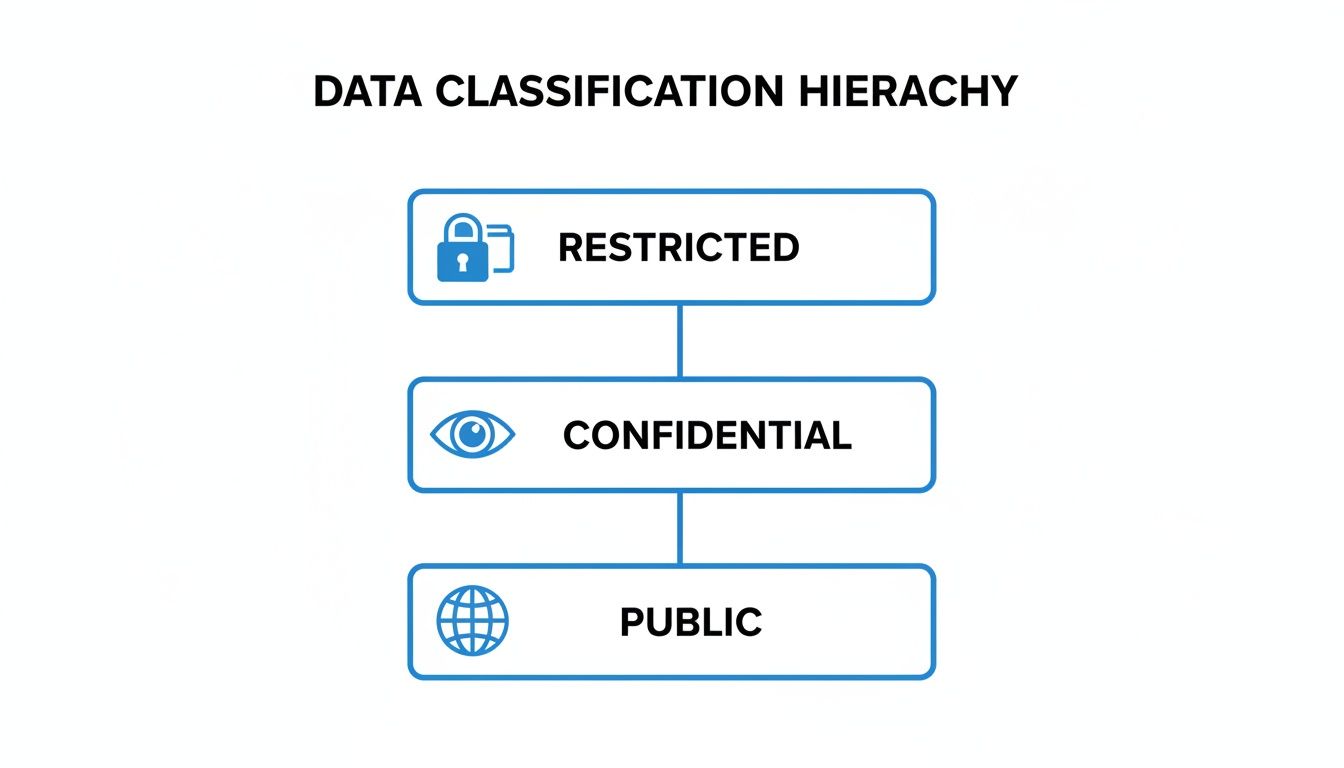
As you can see, the jump from Public to Restricted data requires a serious increase in governance and control, which is where these roles become critical.
The Three Pillars of Data Governance
To make sure your policy is applied consistently everywhere, you need to establish three core roles. The job titles might change from company to company, but the functions are universal.
-
Data Owners: These are your senior business leaders, not IT folks. A Data Owner is the executive accountable for the data created in their department. Think of the VP of Sales as the owner of all customer data in the CRM. They have the final say on who gets access and how it's classified because they ultimately own the business risk tied to that data.
-
Data Stewards: These are your on-the-ground subject matter experts. A Data Steward typically reports to a Data Owner and handles the day-to-day management of a specific dataset. They live and breathe this data—they know its context, its quality (or lack thereof), and how it’s used. A senior financial analyst, for example, might be the steward for the company's quarterly financial data.
-
Data Custodians: This is where your IT and security teams shine. Data Custodians are the technical guardians. They take the rules defined by the Data Owners and make them a reality. They’re the ones managing the databases, servers, and cloud services, making sure that encryption, backups, and access controls are all configured correctly.
One of the most common pitfalls I see is organizations making the IT department the default "owner" of all data. This is a mistake. True ownership has to lie with the business leaders who create and rely on the data—they're the only ones who truly get its value and sensitivity.
A Real-World Healthcare Scenario
Let's see how this plays out in a hospital system. The Chief Medical Officer would be the Data Owner for all patient records, or Protected Health Information (PHI). They are the executive on the hook for protecting it under HIPAA.
The Health Information Manager would be the Data Steward. This person manages the electronic health record (EHR) system, defines data quality rules, and trains nurses and doctors on how to handle patient information properly. They’re the expert on what the data means.
Finally, the IT infrastructure team acts as the Data Custodian. They are responsible for making sure the EHR database is encrypted, network access is locked down, and everything is backed up securely. While defining these roles, it’s a perfect time to look at your broader security rules. For a deeper dive, check out our guide on building a rock-solid access control policy.
Establishing a Governance Committee
To pull all of this together, many companies create a data governance committee or council. This isn't just another meeting—it's the strategic command center for your data program. It should include Data Owners, key Data Stewards, and leaders from IT, security, legal, and compliance.
This group is in charge of:
- Approving the data classification policy and any future updates.
- Acting as the referee when people disagree on a classification level or ownership.
- Handling exception requests when a business need seems to conflict with a policy.
- Making sure the policy keeps up with new regulations and business goals.
By creating this structure, you're building accountability right into the fabric of your company. Data protection stops being "an IT problem" and becomes a shared responsibility.
Developing Practical Data Handling Procedures
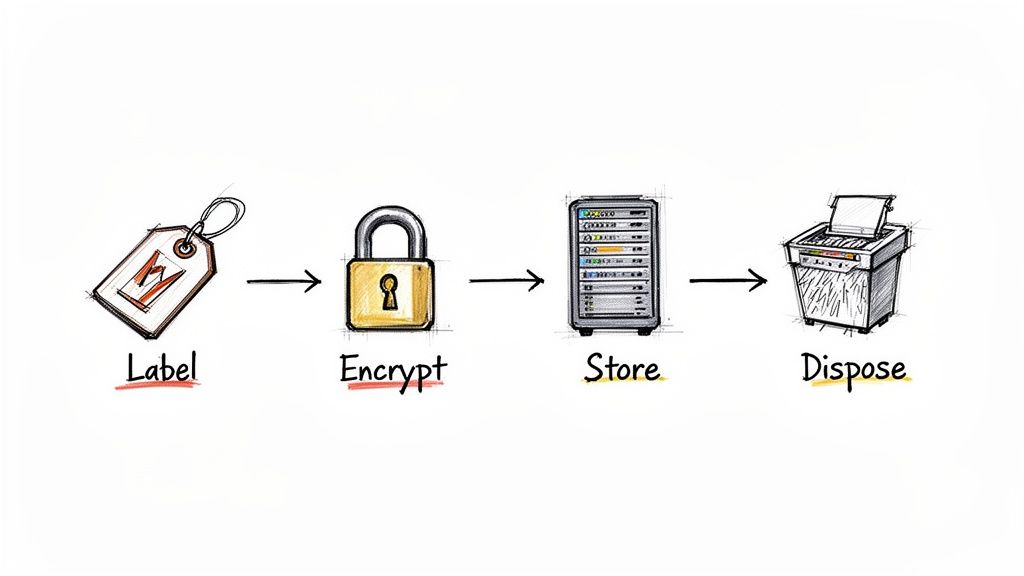
With your classification tiers defined and roles assigned, we get to the most hands-on part: the specific handling procedures. This is where you translate abstract risk levels into concrete, everyday actions for your employees. Vague rules are the enemy of compliance. You need to provide crystal-clear instructions for how data should be labeled, stored, shared, and ultimately destroyed.
This means you have to move beyond just saying "protect Confidential data." You need to provide a playbook. For example, your policy must explicitly state that a 'Confidential' sales forecast spreadsheet must be encrypted before it gets attached to an email and sent to an external partner. It’s this level of detail that turns a policy from a document on a shelf into a daily operational practice.
Establishing Clear Rules for the Data Lifecycle
Every piece of information in your organization has a lifecycle—from creation to disposal. Your handling procedures must map to each stage, laying out specific rules based on the data's classification. Think of it as a set of guardrails for your team.
-
Labeling: This is the first and most critical step. How will people visually tag information? For digital documents, this could mean applying a header or footer like "Internal Use Only." For physical papers, maybe it’s using specific colored folders.
-
Storage: Where is it safe to store data from each tier? Your policy should make it obvious that storing 'Restricted' data (like customer PII) on a personal Dropbox account is a non-starter. Instead, it must live on secured network drives or approved cloud platforms with multi-factor authentication.
-
Transmission: How can data be shared without putting it at risk? A common rule is that 'Confidential' data can only be shared externally via an encrypted email service or a secure file-sharing portal. Sending it through standard email should be explicitly forbidden.
-
Disposal: What happens when data is no longer needed? Your policy needs to spell out the right way to get rid of it. For printed 'Confidential' documents, this means using a cross-cut shredder, not just tossing them in the recycling. For digital files, it means using a secure deletion utility.
The Power of Automated Data Classification
Let’s be honest: asking everyone to manually classify every single document is a huge burden. It's slow, inconsistent, and banks on every employee making the right call every time. This is where automation shifts from a nice-to-have to an absolute necessity for building a scalable policy.
Modern tools can scan documents, emails, and files for keywords or patterns—like credit card numbers or project codenames—and automatically apply the correct classification label. This takes the pressure off your team and drastically cuts down on human error.
Automation is your consistency engine. When a tool automatically tags a document containing employee PII as 'Restricted,' it enforces your policy without anyone having to think about it. This creates a reliable and, importantly, auditable security control.
This move toward automation is exactly why the data classification market is seeing explosive growth. The global market valuation shot from USD 1.65 billion in 2023 to a projected USD 14.57 billion by 2032, reflecting a massive compound annual growth rate of 27.40%. This surge shows a clear industry shift toward structured, tool-driven data management. For compliance teams, this underscores why AI-driven platforms are becoming essential for pinpointing gaps in frameworks like ISO 27001 or GDPR. You can discover more insights about this market growth and what it means for the industry.
Practical Scenarios in Action
To make your policy stick, ground it in real-world scenarios your team will actually run into. Abstract rules are easy to forget, but relatable examples click.
Scenario 1: The Remote Salesperson
A salesperson is working from a coffee shop and needs to send a new client contract, classified as 'Confidential,' for a signature.
- Wrong Way: Attaching the contract as a standard PDF to an email and sending it over the public Wi-Fi.
- Right Way (per the policy): Connecting to the company’s secure VPN, uploading the contract to the approved e-signature platform (like DocuSign), and sending the secure link to the client. The policy provides the "how," not just the "what."
Scenario 2: The HR Manager
An HR manager is processing payroll, which involves spreadsheets full of employee salaries and bank details—classic 'Restricted' data.
- Wrong Way: Saving a draft of the payroll file to their desktop "for easy access."
- Right Way (per the policy): Working exclusively within the secure, access-controlled HR information system (HRIS). Any necessary exports are done on a company-issued, encrypted laptop and are securely deleted immediately after use.
By building these clear, practical procedures into your policy, you empower your team to become your first line of defense. You remove the guesswork and give them the tools and knowledge to handle data securely and confidently every single day.
Implementing Controls and Auditing for Compliance
Let's be honest: a data classification policy that just sits on a shelf is useless. It’s only as good as your ability to actually enforce it. Once you've defined the rules, the real work begins—turning that document into tangible, technical, and procedural controls. This is where your policy stops being a strategic ideal and starts being an active defense.
The goal here is to make compliance the path of least resistance. You want to engineer your systems so that doing the right thing is easy for employees, and doing the wrong thing is difficult, if not impossible. This isn't about one magic bullet; it's a layered approach that weaves together access rules, data monitoring, and solid encryption.
Turning Policy Tiers into Technical Controls
Those classification tiers you worked so hard to define—Public, Internal, Confidential, Restricted—need to map directly to specific security measures. This is how you make the policy a living, breathing part of your IT environment.
Three core technical controls are the absolute backbone of any good enforcement strategy:
- Role-Based Access Control (RBAC): This is your first and most critical line of defense. With RBAC, you grant access to roles, not individuals. An employee in the "Finance Analyst" role automatically gets access to financial systems. Someone in "Marketing" doesn't. It’s the principle of least privilege in action, and it’s non-negotiable.
- Data Loss Prevention (DLP): Think of DLP tools as your digital security guards. They actively monitor, detect, and can even block unauthorized data from leaving your network. For example, a DLP rule can be set to prevent any file labeled 'Restricted' from being attached to a Gmail message or copied to a USB stick.
- Encryption Standards: Data needs protection wherever it lives, whether it's sitting on a server (at rest) or flying across the network (in transit). Your policy must mandate specific encryption standards for each tier, like requiring AES-256 encryption for all laptops that store 'Confidential' data.
Imagine this in practice: A new hire joins the HR department. RBAC automatically provisions their access to the HR information system. Later, if they accidentally try to email a spreadsheet full of employee PII (classified as 'Restricted') to an external vendor, the DLP system instantly blocks the email and flags the attempt for the security team. That's your policy and your tech stack working in perfect harmony.
Verifying Effectiveness with a Practical Audit Checklist
So, how do you know if any of this is actually working? You have to check. Regular audits are the only way to prove you’re meeting compliance standards like ISO 27001 and, more importantly, to find the cracks in your armor before an attacker does.
This isn't just a box-ticking exercise. It's about rigorously pressure-testing your defenses. For a deeper dive into what this looks like, our guide on the tests of controls in auditing breaks it down further.
A solid audit needs to look at both the people and the technology.
Your policy is a promise you make to your customers and regulators. An audit is how you prove you're keeping that promise. It transforms your security from a claim into verifiable evidence.
You can use the checklist below as a starting point for your internal audits. It’s built to be a practical tool for compliance managers and GRC teams to gauge how well the policy is working and to get ready for any external reviews.
The Data Classification Audit Checklist
This checklist gives you a structured way to take your program's pulse, covering everything from basic awareness to the nitty-gritty technical details.
| Audit Area | Key Questions to Ask | Evidence to Collect |
|---|---|---|
| Policy & Governance | Is the data classification policy formally approved, published, and easy for all employees to find? | Signed policy document, communication records, link on the company intranet. |
| Has the policy been reviewed and updated within the last 12 months? | Meeting minutes from the governance committee, document change logs. | |
| Roles & Responsibilities | Are Data Owners, Stewards, and Custodians formally assigned for all critical data assets? | A master register of data owners and the assets they're responsible for. |
| Do these people actually understand and accept their responsibilities? | Signed role acceptance forms, training completion certificates. | |
| Employee Training | Have all new hires been trained on the data classification policy as part of onboarding? | Onboarding training logs, signed attestations. |
| Has the annual security refresher training been completed by everyone? | LMS reports, attendance records for live training sessions. | |
| Technical Controls | Can you show me that RBAC is enforced on a sample of 'Restricted' data systems? | System configuration screenshots, periodic access review reports. |
| Are DLP rules in place to block sensitive data from being exfiltrated? | DLP policy configuration details, incident logs showing blocked attempts. | |
| Is encryption enabled on all laptops and servers storing 'Confidential' or 'Restricted' data? | Endpoint management reports (e.g., BitLocker status), server configuration files. |
By methodically working through a checklist like this, you create a powerful feedback loop. Audit findings will show you where you're strong and, more importantly, where you need to shore up your defenses. This proactive rhythm is the key to maintaining a resilient security posture and proving due diligence to anyone who asks.
FAQs: What to Expect When You Roll Out Your Data Classification Policy
Even the best-laid plans hit a few bumps in the road. When it comes to implementing a data classification policy, anticipating the common questions and hurdles is half the battle. Let's walk through some of the things you'll almost certainly run into as you get your policy off the ground.
Getting ahead of these issues is what separates a policy that just sits on a shelf from one that genuinely becomes part of your company's security DNA.
"How Do We Actually Get People to Follow This?"
This is always the first question, and it’s the most important one. A policy is worthless if no one uses it. From what I’ve seen, successful adoption boils down to two things: making it dead simple and making it everyone's business.
First off, your policy has to be easy to understand. If you roll out a complicated, eight-tier system with fuzzy definitions, people will either ignore it or get it wrong. Stick to a simple 3-4 tier system. Provide clear, real-world examples that someone in marketing can understand just as easily as someone in engineering.
Second, training can't be a one-and-done webinar. Think of it as an ongoing conversation. You need that initial training for everyone, sure, but follow it up with annual refreshers. For teams handling the really sensitive stuff—think finance, HR, legal—you'll need more focused, role-specific sessions.
The real secret sauce? Getting your leaders on board. When managers and executives are vocal champions of the policy and actually use it themselves, everyone else sees it for what it is: a core business function, not just another rule from the IT department.
Your goal is to make the policy feel less like a restrictive rulebook and more like a helpful guide that lets people do their jobs safely.
"What are the Biggest Mistakes We Should Avoid?"
I've seen a few policies fail to launch, and they almost always stumble over the same hurdles. If you can sidestep these, you’re already way ahead of the game.
The most common mistake is overcomplicating things. I can't stress this enough: stick to three or four tiers. Anything more just invites confusion and makes the whole system unusable for the average employee.
Another classic pitfall is creating the policy in a vacuum. Don't let your IT or security team cook this up alone in a dark room. You absolutely have to bring in department heads, legal, and HR from day one. They know the data, the workflows, and the legal requirements. Their buy-in is non-negotiable.
Finally, avoid the "set it and forget it" mentality. Your business isn't static, and neither is your data. Regulations change, new types of data emerge, and threats evolve. Your policy has to be a living document.
- Schedule an annual review. Seriously, put it on the calendar now. Get your data governance group together to review and tweak the policy.
- Keep an eye on regulations. New privacy laws like GDPR or CCPA can pop up and completely change your classification needs.
- Listen to your people. Ask employees what’s working and what’s not. They’re the ones using it every day, and their feedback is gold.
"Should We Automate This? Is It Really Worth It?"
For any organization of a decent size, the answer is a hard yes. In fact, I'd argue that automation is no longer a "nice to have"—it's a requirement for any classification policy to work at scale.
Let’s be realistic. Manual classification is slow, inconsistent, and people make mistakes. You can't expect every employee to perfectly classify every email and document they touch. It’s just not going to happen.
Automation tools take on that burden. They can scan files and emails for keywords (like "Project confidential") or patterns (like credit card or social security numbers) and apply the right classification tag on the fly. This gives you consistency and an audit trail you can actually trust.
But automation isn't a silver bullet that replaces people. The best approach is a hybrid model. Let the tools do the heavy lifting—the 80% of routine work. Then, empower your trained Data Stewards to handle the exceptions, manage the tricky edge cases, and fine-tune the automation rules. You get the scale of technology with the critical thinking and context that only a human can provide. It's the best of both worlds.
At AI Gap Analysis, we know that a rock-solid data classification policy is the bedrock of compliance. Our platform is designed to accelerate your audit process, automatically mapping your documentation against frameworks like ISO 27001. We help you pinpoint where your policies are strong and, more importantly, where the gaps are. Find out how you can turn weeks of manual review into hours of focused, evidence-backed analysis by learning more about our AI-powered GRC tools.